

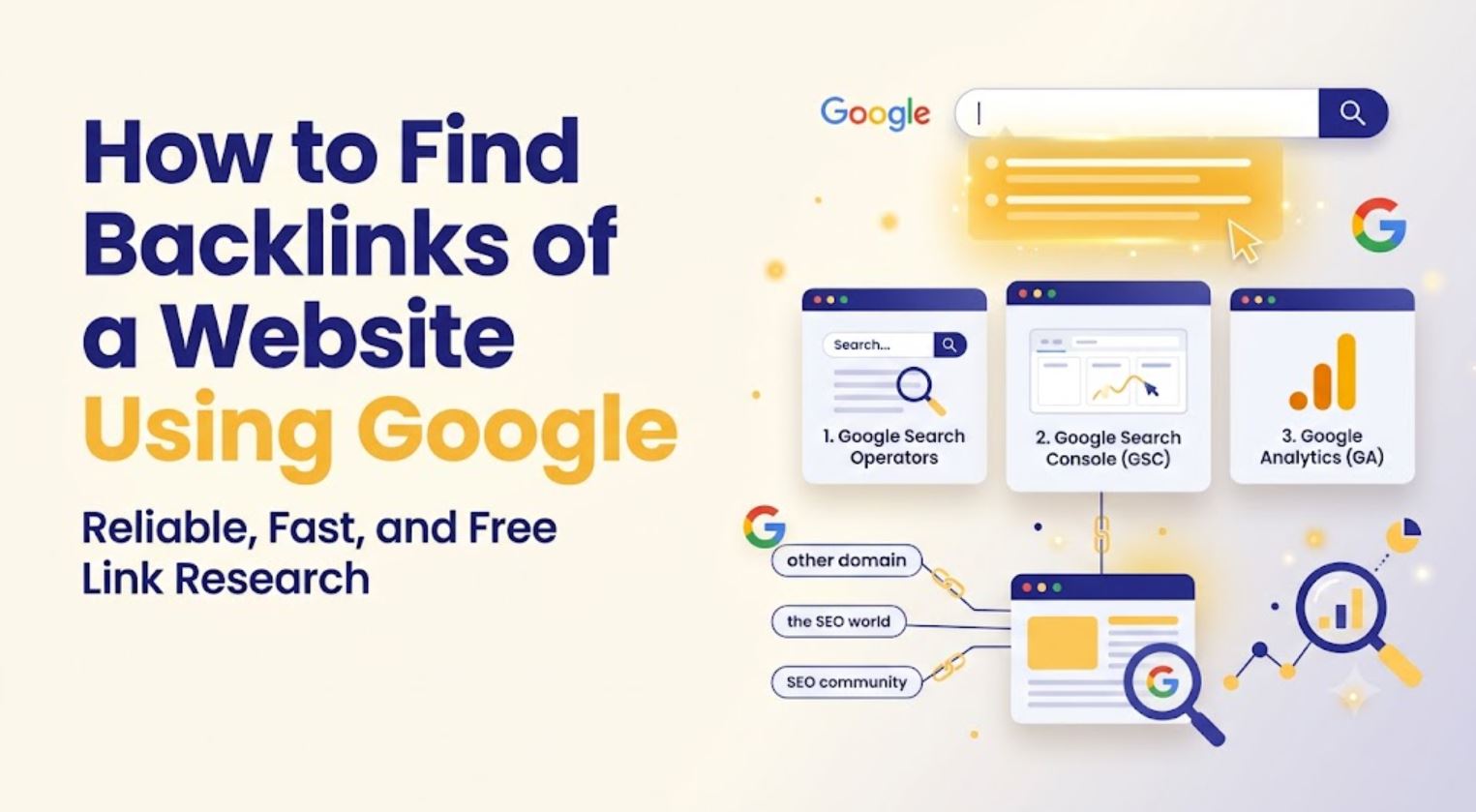
Using Google to find backlinks of a website is still practiced in the SEO community because it is one of the most reliable and fastest ways of finding newly built backlinks. It also tells you which links and placements are crawled and indexed by Google.
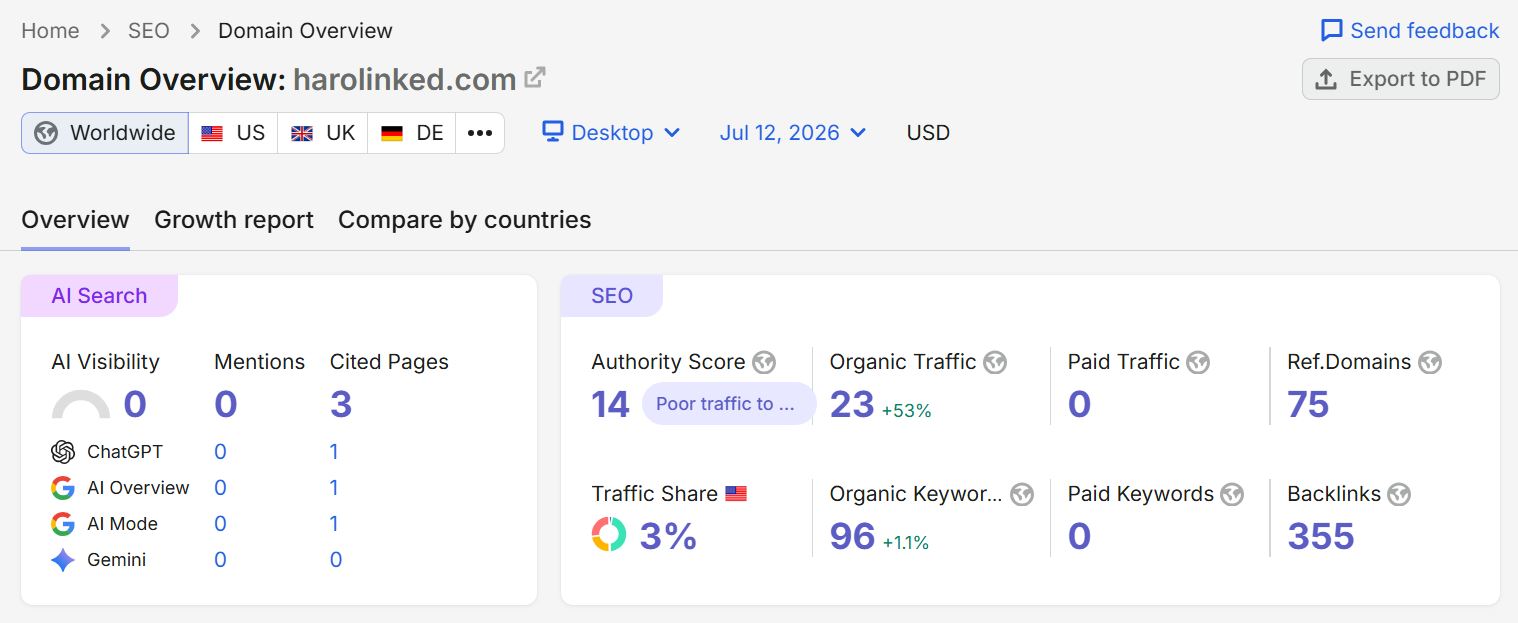
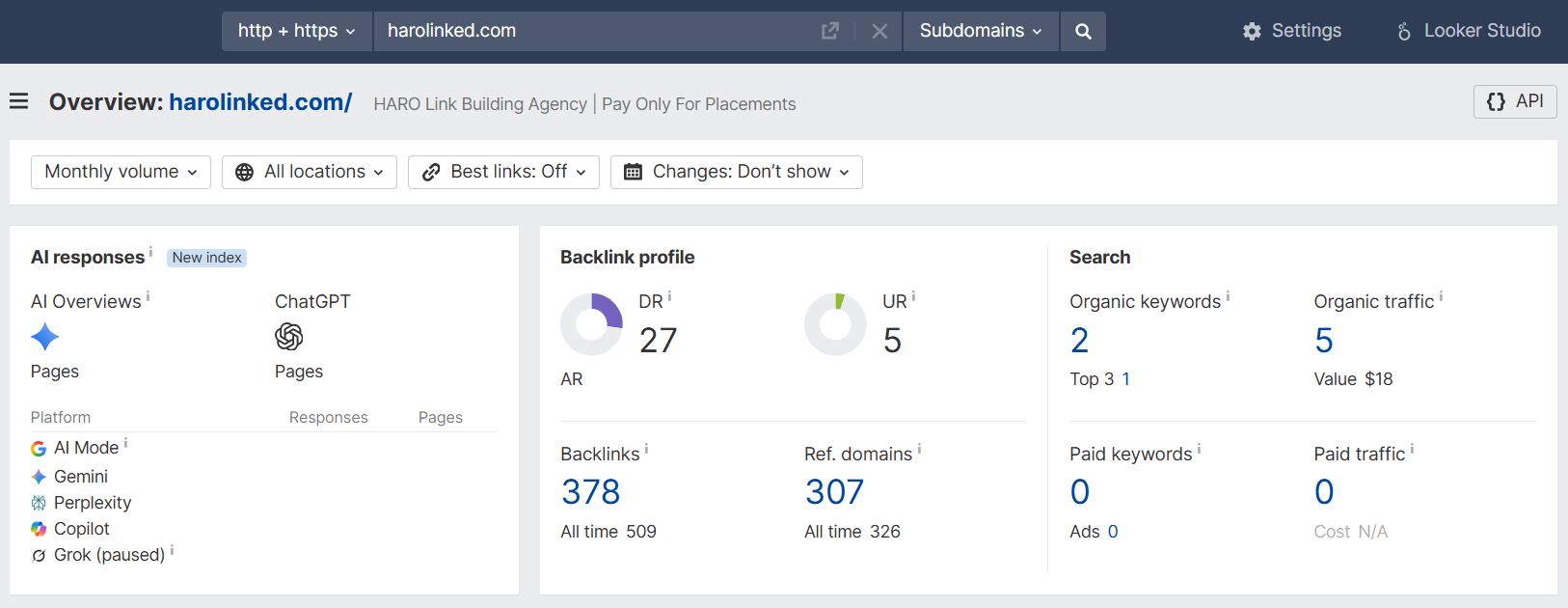
Ahrefs and Semrush are fantastic tools for finding a website’s backlinks, but you know they do not present an identical or complete backlink profile. For example, when we analyze our own site, harolinked.com, the discrepancies are obvious:
I checked harolinked.com’s backlink profile with both Semrush and Ahrefs.
- According to Ahrefs, we have backlinks from 307 referring domains
- Semrush tells a completely different story. It says we only have 75 referring domains, which is incorrect. We surely have backlinks from more than 100 domains as of July 12, 2026.
But why are these tools not showing the same backlink/referring domain report?
Because both Semrush and Ahrefs are third-party tools, with a limited crawl budget and access, that is why finding backlinks with Google search is considered the most authentic and viable technique in the SEO world.
This leaves us with a question: how to find the backlinks of a website using Google search?
There are a few ways to find backlinks via Google search, which we will discuss in this blog. However, there are limitations when it comes to finding competitor backlinks with Google, but you will get an idea of your competitor’s backlink profile using the correct search operators.
Why Should You Track Backlinks?
Because backlinks help you rank higher in Google and get cited in AI overviews and answers,. Also, you can not outrank your competitors in search rankings without understanding their backlink profile.
Regardless of competitors’ backlinks, a newly launched brand still needs links to start appearing and ranking in search engines. The number depends on the industry, service, business type, and a few other factors. Here are more details on how many backlinks you need to rank on Google.
Tracking backlinks is also necessary for established business websites. Because these businesses are already generating revenue and are most probably ranked on a few industry-relevant keywords.
One bad link from a spammy domain can hurt overall rankings. This is the reason we perform an in-depth backlink audit when onboarding a new client. It gives us a clear picture of the client’s backlink profile, which helps us in making decisions like which websites we should target for backlinks and which backlinks we should disavow.
In a nutshell, you need to track backlinks via Google or third-party tools to create and alter your link-building strategy. The process is necessary for new businesses with a fresh website, established businesses, and business owners who want to spy on competitors’ backlinks.
How to Find Backlinks of a Website Using Google & Third-Party Tools?
There are a few search operators that can help find existing relevant backlinks of your website and your competitors’ websites. You can also use Google Search Console and Google Analytics to see which backlinks Google has added to your backlink profile and which websites are sending direct traffic.
This won’t be possible with competitor websites because you don’t have access to their GSC and GA. After that, we can use third-party SEO tools like Ahrefs, Semrush, and SE Ranking.
| Method | Free | Finds All Backlinks | Best For |
|---|---|---|---|
| Google Search | ✅ | ❌ | Brand mentions & indexed references |
| Google Search Console | ✅ | ❌ | Your website’s backlinks |
| Ahrefs | ❌ | ✔️ | Competitor backlink analysis |
| Semrush | ❌ | ✔️ | SEO audits and backlink research |
| Majestic | ❌ | ✔️ | Trust Flow and Citation Flow analysis |
We often use all three techniques to create a backlink profile for our client to make educated decisions and a link-building campaign that reflects results.
1- How to Find Backlinks of a Website Using Google Search
Google can help you identify a website’s backlink profile if used correctly, but it does not give the complete picture. I have created a guide on using search operators to modify results and exclude words from Google search.
To find backlinks of a website using Google search, you will need these search operators:
A) Link:Yourwebsite.com
This is an outdated technique to find backlinks of a website via Google. This search operator gives you a list of domains linking to your website and was historically used by SEOs to find backlinks. However, in 2017, Google’s John Mueller announced that this search operator had been officially retired by Google.
B) “Yourwebsite.com”
Typing your domain name with inverted commas can give you a list of websites that have linked to or mentioned your website. This is best to find websites that have linked to or mentioned competitors and to find unlinked mentions.
We use these techniques to find unlinked brand mentions for clients. We create a list of websites that have mentioned our clients but not linked to their websites. Secondly, we reach out to them, asking for a backlink to the mention.
We also check competitors who have got a mention/link from high DR and relevant websites with these search operators. Outreach to the websites, asking them to backlink or mention our clients as well.
If you remove the domain extension “.com” from the search, you will get branded mentions of your websites and competitors. These websites can be contacted for a backlink.
Type this in the Google search bar. “yourwebsite.com” or “Yourbrand”.
2- Finding Backlinks of a Website Using Google Search Console
Google Search Console provides the backlink profile of a website. This shows how Google perceives backlinks you have built or earned over the years.
You can only use this technique to find websites linking to your domain and not competitors. Here are the steps to find backlinks to your website using GSC:
- Open GSC on your device and select the domain you want to check
- Click on “Links” from the left menu. The Links option can be found under Security & Manual Actions.
- You will be directed to a page with “external links and internal links.” The external links section has more details like top linked pages, top linking sites, and top linking text.
- Click on the top linking sites to get the list of websites linking to your domain.
While GSC provides an excellent overview of your external links, exporting and filtering massive datasets can be cumbersome compared to the instant filtering and sorting functionality offered by third-party SEO tools like Ahrefs or Semrush.
It will not tell you the websites linking to your inner pages, like blogs, case studies, images, service pages, etc. For that, we have to rely on third-party SEO tools like Semrush, Majestic, etc. You can also use Google Analytics to find pages with direct traffic from other websites.
3- How to Find Backlinks Using Google Analytics?
Google Analytics can help you identify websites that are sending referral traffic to your website. While it doesn’t provide a complete list of backlinks like Google Search Console or Ahrefs, it is useful for discovering which backlinks are actually driving visitors to your site.
Follow these steps:
- Sign in to your Google Analytics account.
- Select the property you want to analyse.
- In the left-hand menu, go to Reports → Acquisition → Traffic Acquisition.
- Change the primary dimension to Session source/medium.
- Look for sources with the medium referral (for example, yoursite.com/referral).
- Click on a referring domain to see which landing pages on your website are receiving traffic from that source.
- Export the report if you want to analyse your referral backlinks further or share them with your team.
Keep in mind that Google Analytics will only show backlinks that have generated visits to your websites.
4- Using Third-Party SEO tools
The last and one of the most used techniques to find backlinks of a website is using third-party SEO tools like Ahrefs, Semrush, Majestic, SEranking, etc.
At HAROLinked, we primarily use Ahrefs and Semrush to analyse our clients’ backlink profiles and research their competitors. While Ahrefs offers a free backlink checker that provides a snapshot of a website’s backlink profile, the paid version gives you access to far more data and advanced filtering options.
Follow these steps to check backlinks using Ahrefs:
- Sign in to your Ahrefs account.
- Enter the website or URL you want to analyse into Site Explorer.
- Click Search.
- From the left-hand menu, select Backlinks.
- Browse the complete list of backlinks pointing to the website. You can filter the results by Dofollow, Nofollow, New, Lost, Anchor Text, Referring Domain, language, platform, and more.
- Export the backlink report if you need to analyse it further or share it with your team.
A healthy backlink profile typically contains a mix of dofollow and nofollow links from relevant, trustworthy websites. Rather than focusing solely on the number of backlinks, pay close attention to the quality, relevance, and diversity of your referring domains.
The best link-building strategy is made using these three techniques. I use GSC, GA, and Ahrefs to evaluate a client’s backlink profile and make educated decisions on the kind of backlinks we need to rank high in Google and AI answers.
Furthermore, tools like Ahrefs and Semrush also tell us about bad links in our backlink profile. I make a list of these backlinks after checking them manually. I copy this list into Notepad and submit it for disavow in Google Search Console.
What Kind of Backlinks are Good?
This is one of the most asked questions in the SEO community. But the answer is quite simple!
A backlink is classified as a good backlink if it has certain elements:
- Relevancy
- Authority
- In content
- Dofollow
- The topic and website should be relevant to your niche
I have written a guide on high-authority backlinks and how to get them. You should check it out for more information.
How to Get Good Backlinks?
There are many ways to earn good backlinks for your website. We offer a free link-building strategy, tailored to your website and business needs. Here is a quick overview of the most effective link-building techniques used by our team:
- Digital PR & HARO Links – Get featured in news websites and online publications by providing expert insights to journalists.
- Editorial Sponsored Posts – Publish high-quality editorial content on authoritative websites with contextual backlinks.
- Guest Blogging – Write valuable articles for niche-relevant blogs and earn backlinks within the content.
- Blogger Outreach – Build relationships with website owners to secure natural, relevant backlinks.
- Listicle Placements – Get your brand featured in “Best X” or “Top Y” articles on trusted websites.
- Niche Edits (Link Insertions) – Add your backlink naturally to existing, relevant articles that already have authority and rankings.
- Resource Page Links – Get listed on curated resource pages that recommend useful tools, products, or services.
- Broken Link Building – Find broken links on relevant websites and suggest your content as a replacement.
- Competitor Backlink Replication – Analyse where your competitors are getting backlinks and pursue similar opportunities.
- Unlinked Brand Mentions – Turn existing mentions of your brand into clickable backlinks by contacting the publisher.
Final Word
Checking backlinks shouldn’t rely on a single tool. Google Search is excellent for finding indexed mentions and references, Google Search Console shows the backlinks Google has associated with your website, Google Analytics reveals which links are driving referral traffic, and tools like Ahrefs and Semrush provide the most comprehensive backlink data available. Using all four methods together gives you a clearer picture of your backlink profile and helps you make smarter SEO decisions.
If you’d like a professional backlink audit or a customised link-building strategy, our team at HAROLinked can help. We’ll analyse your backlink profile, identify opportunities, and build high-quality backlinks that improve your rankings and online visibility.
Frequently Asked Questions
Can I find backlinks without Ahrefs?
Yes. You can use Google Search, Google Search Console, and Google Analytics to find backlinks for free. However, these methods have limitations. For a complete backlink profile and competitor analysis, tools like Ahrefs or Semrush are more effective.
Is Google Search accurate for finding backlinks?
Google Search is useful for finding indexed backlinks, brand mentions, and references to your website. However, it does not show every backlink pointing to a website, so it should be used alongside Google Search Console or third-party SEO tools.
Can I see competitor backlinks in Google Search Console?
No. Google Search Console only shows backlink data for websites you own and have verified. To analyse competitor backlinks, you’ll need to use Google Search operators or third-party SEO tools such as Ahrefs or Semrush.
Why do Ahrefs and Semrush report different backlink numbers?
Ahrefs and Semrush maintain their own web crawlers and backlink databases. Since they crawl the web differently and update their indexes at different times, the number of backlinks and referring domains reported by each tool will often vary.
How often should I check my backlinks?
For most websites, checking your backlink profile once a month is sufficient. If you’re actively running a link-building campaign or have recently experienced a drop in rankings, review your backlinks weekly to identify new opportunities or harmful links before they impact your SEO.