


When you type a query into a search engine, you are often flooded with millions of pages of irrelevant information. Finding exactly what you need requires knowing how to filter out the noise. If you are trying to conduct clean market research, trace a specific digital PR lead, or simply hunt down an exact piece of data without cluttering your screen, learning how to exclude words from Google search is crucial for finding target sites when building high-authority backlinks for your brand.
Most users settle for whatever results land on the first page, unaware that they can actively program their search queries. This comprehensive guide will show you exactly how to exclude words from Google search results, detail the advanced syntaxes required to streamline your workflow, and explain how to use advanced parameters like the Google search must include operator to gain absolute control over your web browser.
Why You Need to Know How to Omit Keywords from Google Search
The internet is expanding exponentially, and with the rise of automated content generation, search indexing has become increasingly crowded. Standard search queries rely heavily on semantic associations. If you search for a term like “Apple,” Google naturally assumes you might want information on the technology company, the fruit, nutritional data, or local orchards.
If you are looking strictly for botanical data, the tech giant’s footprint ruins your results. Learning how to omit keywords from Google search allows you to strip away those dominant, commercial search verticals. By refining your input parameters, you save hours of manual filtering, uncover hidden niche pages, and train the search algorithm to deliver highly specific indexing matches.
How to Exclude a Word from Google Search: The Basics
The core mechanism used to strip unwanted terms from your search query is the minus symbol (-), mathematically known as the subtraction operator. In digital literacy and computing architecture, this is called a Boolean exclusion filter.
When you want to understand how to exclude a word from Google search, the syntax rules are incredibly strict. The search algorithm reads space sequences dynamically. To force the engine to drop a specific term, you must place a space before the minus sign, but absolutely no space between the minus sign and your excluded keyword.
The Standard Subtraction Formula:
[Target Core Search Term] -[ExcludedWord]
For instance, if you want to look up historical information about the animal jaguar, but your results page is filled entirely with local car dealerships and automotive reviews, your search phrase should look like this:
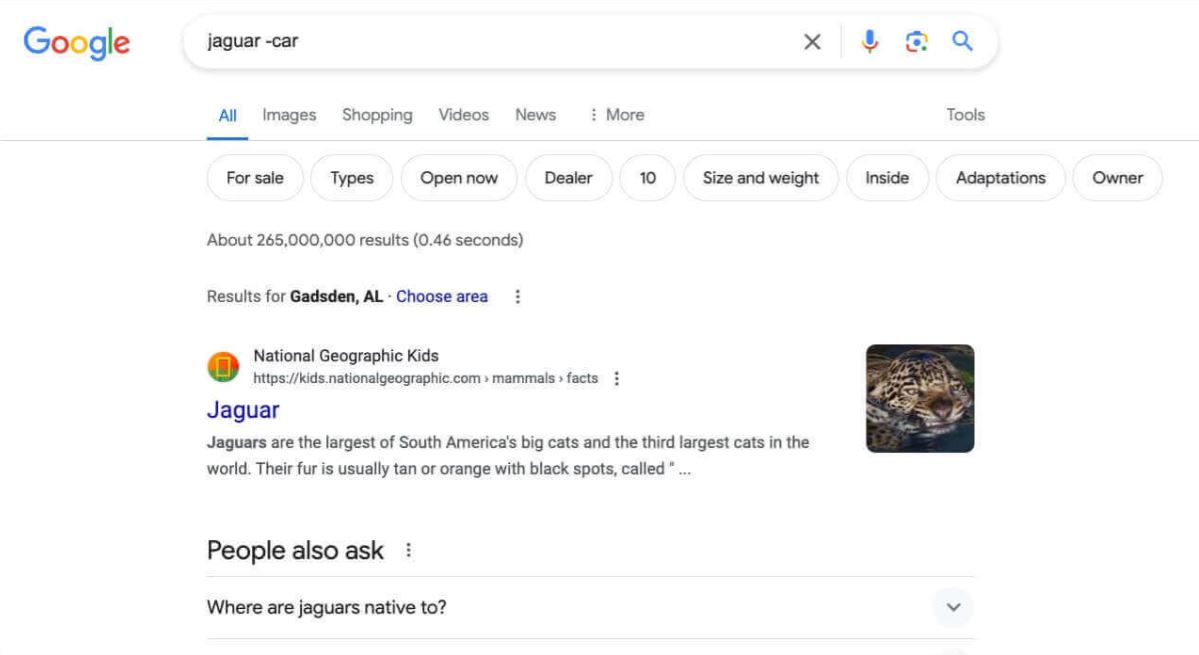
Notice that there is a distinct gap between the animal name and the minus sign, but the word “car” is glued directly to the operator. If you accidentally type jaguar - carGoogle’s parser will treat the dash as a hyphen or a literal break, failing to implement the exclusion rule entirely.
Step-by-Step: How to Exclude Certain Words from Google Search
Filtering out a single broad concept is simple, but real-world data collection often requires removing multiple overlapping layers of information. If you want to know how to exclude certain words from Google search simultaneously, you can stack the negative Boolean operator repeatedly within a single search session.
1. Define Your Primary Target Search Phrase
Type your main search phrase into the input field first. For example, if you are looking for digital marketing case studies, similar to how we break down client performance in our case: home security brand portfolio, start with your core topic: digital marketing case studies.
2. Identify the First Layer of Irrelevant Content
Review the first few results to see what junk data is cluttering your feed. If freelance marketplaces like Upwork are dominating the landscape, append your first exclusion rule by typing a space, a minus sign, and the brand: -upwork.
3. Stack Additional Exclusion Operators
To eliminate further clutter like video content or course sales platforms, add consecutive operators separated by spaces. Your search string expands dynamically: digital marketing case studies -upwork -video -course.
4. Execute the Search and Audit the Feed
Hit enter. Google will process the input sequence, executing a massive programmatic cull of any indexed page containing the filtered tokens, giving you a completely customized information stream.
How to Exclude Words from Google Search: Quick Operator Reference
For quick optimization during active search runs, bookmark this semantic matrix. This layout illustrates how different combinations alter what the search indexing engine chooses to display or hide.
| Search Goal | Correct Syntax Example | Structural Behavior |
| Simple Term Exclusion | recipe -chicken |
Removes all pages mentioning chickens from the broader recipe index. |
| Multi-Word Exclusion | jobs -remote -hybrid |
Narrows down career openings strictly to traditional, on-site physical roles. |
| Exact Match Phrases | "content marketing" -agency |
Locks the core phrase as an exact match while discarding agency sites. |
| Domain Exclusions | seo tips -site:wikipedia.org |
Pulls relevant optimization strategies while hiding entries from Wikipedia. |
How to Exclude Words from a Google Search When Dealing with Exact Phrases
A common issue arises when the term you want to eliminate is not a single word, but an entire multi-word phrase. If you attempt to write -social media, the system reads the space after the word “social” as a break. It will successfully exclude the word “social,” but it will completely ignore the word “media,” often leading to broken search results.
To fix this, you must learn how to exclude words from a Google search using quotation mark encapsulation. By wrapping a phrase in double quotes (""), you tell the crawler to treat that specific sequence of words as a single, indivisible string of text.
Syntax for Phrase Exclusion:
"job openings" - "entry level"
This command tells the indexing system to look for pages containing the phrase “job openings,” while instantly dropping any page that mentions the specific phrase “entry level.” This approach is highly effective for filtering out specific product lines, corporate competitors, or boilerplate disclaimers during deep-web audits.
Advanced Search Logic: The Google Search Must Include Operator
Effective web optimization isn’t just about hiding terms; it’s also about enforcing absolute requirements. Historically, searchers used the plus sign (+) as an inclusion command. However, Google has deprecated the plus operator, replacing it entirely with quote-based encapsulation.
The modern Google search must include an operator is executed by wrapping your mandatory term or phrase inside explicit double quotation marks " ".
When you run a standard, unquoted search like link building strategies, Google uses semantic mapping to display results that contain synonyms like “backlink tips” or “SEO outreach,” even if the exact words “link building” are missing from the page.
// How the engine interprets unquoted vs. quoted parameters:
Unquoted: link building -> Matches synonyms, related concepts, and loose phrase matches.
Quoted:  "link building" -> Forces the crawler to drop any page lacking that exact lexical sequence.
If you combine the inclusion rules with your exclusion rules, you unlock professional-grade sourcing capabilities:
"digital PR" -"press release" -newswire
This query forces the engine to display pages that explicitly contain the phrase “digital PR,” while instantly blocking any results that mention “press release” or the token “newswire.” This tactic allows digital marketers to find organic editorial opportunities, a strategy we rely on heavily at our tech PR agency to scale SaaS link building campaigns without relying on low-grade automated distribution networks.
How to Exclude Keywords from Google Search via the Advanced Search Interface
If you prefer a visual interface over typing manual symbols and operators directly into the search bar, Google offers a dedicated menu built specifically to handle these complex adjustments. This interface acts as an automated query builder, translating forms directly into backend operators.
[ Google Search Settings Dashboard ]
  ├── Find pages with...
  │     ├── all these words:      [ digital marketing ]
  │     ├── this exact word/phrase:[ case study        ]
  │     └── none of these words:  [ agency software    ]  <-- Automatically inserts the minus operator
Navigating to the Query Builder:
-
Execute any initial search on Google.com.
-
Click the Quick Settings gear icon located in the upper-right corner of the interface.
-
Select Advanced Search from the dropdown menu to open the advanced form.
-
Locate the field labeled “none of these words”.
-
Input the terms you want to omit, separated by a single space.
-
Click the blue Advanced Search confirmation button at the bottom of the page.
Once submitted, Google automatically processes your parameters, formats them with the correct syntax spacing, and updates your active URL string to show the filtered results.
Optimizing for the Future: How Search Engines and AI Crawlers Read Queries
Understanding how to exclude words from Google search is incredibly useful for everyday web navigation, but it is also highly relevant to how modern search platforms and AI models process information. As platforms like Harolinked.com focus on building authority, knowing how content is indexed helps you optimize for both human audiences and automated systems.
Modern search engines, along with LLM (Large Language Model) AI crawlers, interpret web data through a process called Vector Embedding. Instead of just looking for exact keyword matches, they analyze the relationships between words across a page to map out its overall context.
[Traditional Search] ─── Looks for exact text matches (e.g., "-car")
[Modern AI Search]   ─── Evaluates context vectors to understand conceptual relationships
When you use exclusion operators like -car, you are actively reshaping the contextual neighborhood of your search query. For web creators and digital PR professionals, this highlights the importance of semantic clarity. As platforms like Harolinked.com focus on building authority, securing citation-grade links ensures that AI answer engines recognize your entity context and categorize your pages accurately. This clarity makes it easier for algorithms to identify exactly what your content is about, and what it isn’t, helping you stand out in an increasingly crowded digital landscape.
If your website covers a specific niche, ensuring your content uses precise, highly relevant vocabulary allows search engine crawlers and AI answer engines to categorize your pages accurately. This clarity makes it easier for algorithms to identify exactly what your content is about, and what it isn’t, helping you stand out in an increasingly crowded digital landscape.
Troubleshooting Common Exclusion Errors
If your search filters aren’t working as expected, a minor formatting issue is usually the cause. The search engine’s query parser reads symbols very literally, meaning even a small extra space can disrupt the intended behavior.
-
The Inverted Space Error: Writing
keyword- excludedinstead ofkeyword -excluded. This tells the parser to search for a hyphenated word rather than filtering out a term. -
The Missing Phrase Quotes: Writing
-digital PRinstead of-"digital PR". Without quotes, the engine only filters out the word “digital,” while still returning pages that contain the word “PR.” -
Operator Overload: Including too many negative parameters in a single query can overly restrict your search space, leading to an empty results page. If this happens, try removing filters one by one to find the right balance.
By mastering these basic syntax rules and avoiding common formatting traps, you can cleanly filter out irrelevant results and quickly locate the exact data, sources, or technical insights you need.
Technical Note for Search Marketers:
When using advanced operators for automated competitive research or web scraping, keep in mind that submitting rapid, complex queries with multiple operators can sometimes trigger security check-points like Google’s reCAPTCHA. This happens because the system flags the precise, structured input patterns as potential automated bot traffic.
Advanced Operator Combinations for Clean Data Sourcing
Once you are comfortable with basic keyword exclusions, you can combine multiple advanced operators to create highly targeted search queries. This approach is particularly useful for tracking brand mentions, conducting competitive analysis, or identifying high-authority media opportunities.
Tracking Brand Mentions While Filtering Out Owned Channels
If you want to see where a brand like “Apple” is being discussed across the web, but you want to exclude their own official website and social profiles, you can structure your query like this:
"Apple" -site:apple.com -site:twitter.com -site:instagram.com
Finding Unlinked Brand Mentions for Digital PR
For digital PR and link-building campaigns, finding websites that mention your brand but aren’t linking back to you is a great way to identify outreach opportunities. You can search for articles about your brand while filtering out your own site and major social platforms:
"BrandName" -site:yourwebsite.com -site:linkedin.com -site:youtube.com
Searching Within Specific Resource Pages
If you are looking for high-quality educational resources or resource pages within a specific niche while avoiding commercial e-commerce sites, you can combine the inurl: operator with keyword exclusions:
inurl:resources "SEO tips" -shop -store -cart -checkout
This query targets URLs that contain the word “resources” and feature the exact phrase “SEO tips,” while instantly filtering out transactional pages to keep your results focused on educational content.
Conclusion: Mastering Search Efficiency
Learning how to control your search parameters is a simple yet powerful way to save time and improve the quality of your online research. By using the minus operator to exclude irrelevant terms, wrapping exact phrases in quotes, and strategically combining advanced operators, you can cut through the noise and get straight to the information that matters most.
Whether you are auditing your brand’s digital footprint, sourcing data for an article, or looking for specific media placements, these search techniques allow you to navigate the web with much greater precision.
Frequently Asked Questions
How do I exclude words from Google Search?
To exclude words from Google Search, place a minus sign (-) directly before the word you want to remove. For example, searching jaguar -car will show results about the animal while filtering out pages related to cars.
How do I exclude a word from Google Search?
The easiest way to exclude a word from Google Search is to use the minus (-) operator. Make sure there is a space before the minus sign and no space between the minus sign and the excluded word.
How do I omit or exclude keywords from Google Search?
If you want to omit keywords from Google Search, simply add a minus sign before each unwanted keyword. You can exclude multiple keywords in the same search, such as SEO -agency -course -YouTube.
How do I remove keywords from Google Search results?
You cannot permanently remove keywords from Google’s index, but you can remove them from your search results by using the exclusion operator (-) or Google’s Advanced Search filters.
What does “Try different keywords or remove search filters” mean?
This message appears when Google cannot find enough relevant results for your query. Try using fewer keywords, removing search filters, or broadening your search terms to return more results.
Can I exclude a website from Google Search?
Yes. You can exclude a website by using the -site: operator. For example, SEO tips -site:wikipedia.org removes results from Wikipedia while keeping results from other websites.
What is the Google Search “must include” operator?
Google no longer supports the old plus (+) operator. Today, the best way to require a specific word or phrase is to place it inside quotation marks. For example, searching “digital PR” -newswire ensures the exact phrase appears in the results.
Can I block keywords on Google Chrome?
Google Chrome does not have a built-in feature to block keywords in search results. However, you can filter search results using Google’s search operators or install browser extensions that hide pages containing specific keywords.
How do I search by only keywords on Google?
To search using only specific keywords, place the exact phrase inside quotation marks. You can combine quotation marks with exclusion operators to make your search even more precise.
How do I see “not provided” keywords in Google Analytics?
Google no longer shares most organic keywords due to privacy reasons. The best way to identify those queries is by using Google Search Console, which provides the search terms users entered before clicking on your website.
Can I remove a Google search result?
If you own the website, you can remove a Google search result by deleting the page, adding a noindex directive, or requesting removal through Google Search Console. If you do not own the page, you must contact the website owner or submit a removal request if the content qualifies under Google’s removal policies.